| Attribute | Matte PLA | Regular PLA | What It Means for Layer Lines |
|---|---|---|---|
| Layer-Line Camouflage (0–10) | 8 | 5 | Matte surfaces reduce sharp “sparkle” highlights, so layer steps read as softer texture instead of crisp ridges. |
| Specular Highlight Strength (0–10) | 2 | 7 | Higher specular reflection makes every tiny Z-step catch light. Matte tends to spread light, making ridges less “outlined.” |
| Finish Sensitivity to Speed/Temp (0–10) | 5 | 8 | Regular PLA often changes sheen with perimeter speed and cooling changes, creating shiny/matte bands that make lines stand out more. |
| “Smooth-Looking” Layer Height Range with 0.4 mm Nozzle (mm) | 0.08–0.28 (process window, not material-specific)[g] | 0.08–0.28 (process window, not material-specific)[g] | Matte hides lines better, but smaller layer heights still physically reduce step size on curves. Both matter. |
| Practical Max Layer Height vs Nozzle | ~70–80% of nozzle diameter[h] | ~70–80% of nozzle diameter[h] | Past this, step height becomes large and the surface “terraces” hard—matte can’t fully mask that geometry. |
| Gloss Measurement Angles Used in Industry | 20° / 60° / 85° (glossmeter geometries)[c] | 20° / 60° / 85° (glossmeter geometries)[c] | If you want a repeatable way to compare “how matte” two prints are (and predict line visibility), these angles are the common baseline. |
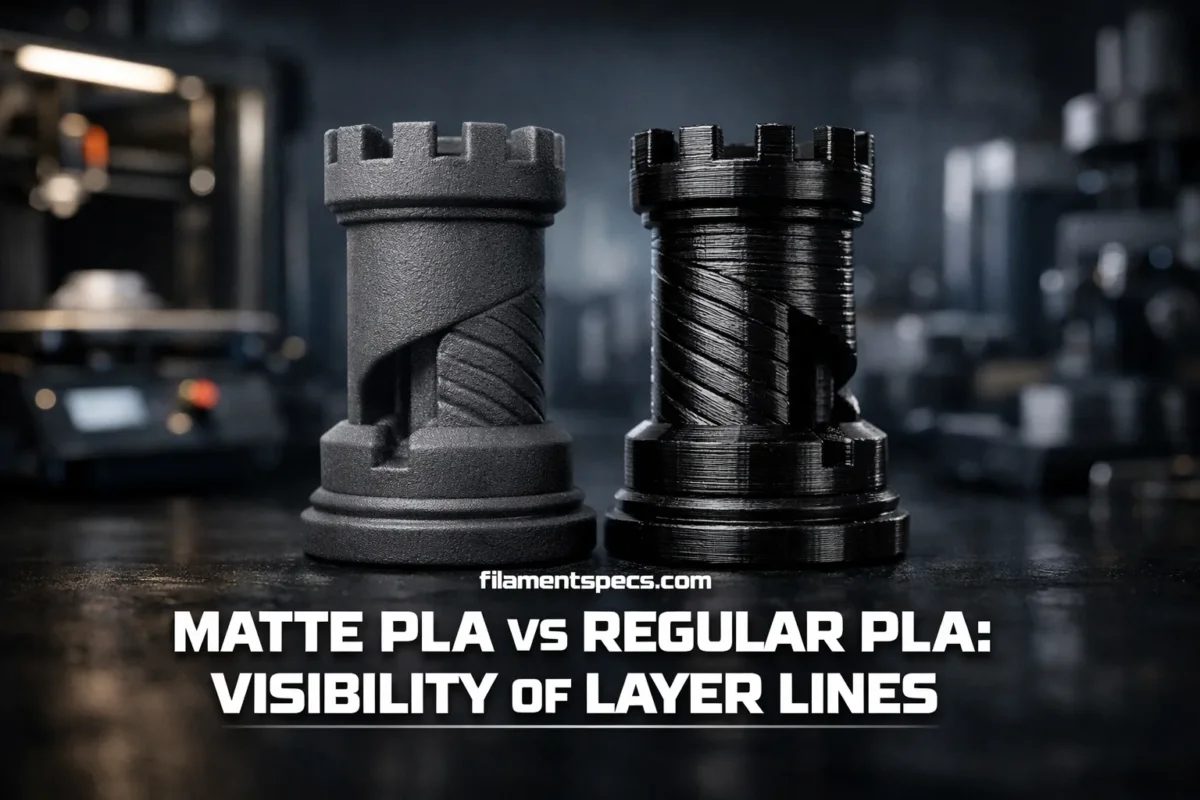
Layer lines are physical steps, but how visible they look is mostly an optics problem: what the surface does to light. That’s why Matte PLA can make a print look “cleaner” at the same layer height where Regular PLA looks striped. This guide stays information-first: what changes layer-line visibility, how Matte vs Regular PLA behaves under different lighting, and how to control the finish without guesswork.
Table of Contents
🧩 Layer Line Visibility Basics
In filament-based printing, a model is built by successive addition of material in stacked layers, and the outer surface is the edge of those layers. That stepwise construction is the root of layer lines, whether you call the process FFF or FDM (industry terminology lives under the broader “additive manufacturing” umbrella).[a]
Two prints can have the same layer height and still look wildly different. The reason is that your eyes don’t measure geometry directly—they read contrast: bright reflections, shadows, and repeating bands. Layer lines become “visible” when the surface creates consistent highlight/shadow patterns that your vision picks up as stripes.
- Physical Layer Step
- The actual height difference between layers. Reduced by smaller layer height or adaptive/variable layer height.
- Optical Contrast
- How strongly light changes across the surface. Reduced by matte finishes, diffuse reflection, and texture that breaks up highlights.
- Perception Amplifiers
- Harsh side lighting, glossy sheen, dark colors, and large smooth curves make stripes easier to notice.
✨ Why Matte PLA Usually Hides Layer Lines Better
Matte PLA is still PLA at its core, but it’s designed (and/or engineered in how it freezes) to reduce specular reflection. In coatings science, the “matte” effect commonly comes from micro-scale surface unevenness that increases light dispersion and lowers the intensity of reflected light—so highlights blur instead of forming sharp reflections.[b]
That same optical mechanism is why matte filament can make layer lines feel “smaller” than they are. The ridge is still there, but the highlight that outlines it is softened. Think of it as moving from a crisp mirror-like stripe to a subtle, powdery gradient.
Matte PLA’s Layer-Line Advantage
- Lower “sparkle” under direct light, so stripes read as gentle texture.
- More forgiving in product photos and showroom lighting.
- Surface detail (engraving, panel lines) can look crisper because glare doesn’t wash it out.
What Matte PLA Does Not Do
- It doesn’t magically flatten the geometry—coarse layers on curved parts still look stepped at close distance.
- It can’t fully hide banding from inconsistent cooling/speed; it only reduces how harsh the shine looks.
- It doesn’t prevent seams, blobs, or ringing; it may just make them less reflective.
🔦 Gloss, Light, and How Layer Lines “Pop”
Gloss is basically “how much the surface behaves like a mirror.” A glossy print creates bright, directional highlights; a matte print spreads light out. If you’ve ever rotated a glossy PLA part under a lamp and watched stripes appear and disappear, you’ve seen layer lines acting like tiny repeated facets.
If you want a repeatable, technical way to talk about “matte vs glossy,” coatings and plastics industries use standardized gloss geometries such as 20°, 60°, and 85° for measurement.[d] The point isn’t to turn your hobby into a lab—it’s to understand that “layer-line visibility” is tightly tied to measurable surface reflection behavior.
| Lighting Setup | What You See | Why It Happens |
|---|---|---|
| Side Light (Raking Light) | Layer lines look deeper and more “striped” | Shadows deepen between steps; contrast spikes on every ridge. |
| Overhead Soft Light | Lines look subtler and more uniform | Fewer sharp shadows; reflection is spread across a wider area. |
| Direct Point Light (Bare Bulb) | Glossy PLA shows bright bands and glare | Specular highlights form narrow stripes that track the surface angle. |
| Diffuse Light Box | Matte and Regular PLA look closer than usual | Diffuse light reduces highlight edges, lowering perceived banding. |
Relative Optical Behavior (Higher Fill = Stronger Effect)
Matte PLA Surface Reflection Profile
Regular PLA Surface Reflection Profile
⚙️ Process Variables That Change Finish
Here’s a content gap many comparisons skip: you’re not only comparing two filaments—you’re comparing two optical outcomes. Regular PLA can print matte. Matte PLA can print shinier than expected. The “finish” is a combined result of material + thermal history + speed + cooling.
Extrusion temperature and cooling are major levers. Higher temperatures often allow smoother flow and can increase gloss; lower temperatures or fast cooling can push the surface toward a more matte appearance due to how the polymer freezes and how micro-texture forms during extrusion.[f]
Speed consistency matters too, especially for glossy materials: changing perimeter speed across different features can change reflectivity and create “finish banding,” which visually reinforces layer transitions. That’s why modern slicers have features aimed at keeping the visible surface finish more uniform across a print, rather than letting slowdowns create alternating shiny/matte zones.[e]
When Matte PLA Wins Clearly
- Large smooth curves (helmets, vases, housings) where regular PLA creates long, bright highlight bands.
- Studio lighting, desk lamps, and phone flash—situations with sharp highlights.
- Models that need a “manufactured” look without post-processing.
When Regular PLA Can Look Surprisingly Clean
- Parts with intentionally textured surfaces (knurls, stipple, small facets) where reflection is already broken up.
- Very fine adaptive layer height on the most visible curves, minimizing the step size your eye can catch.
- Prints shown under diffuse light rather than direct raking light.
🧱 Geometry and Texture That Change Line Visibility
Layer lines are most visible on continuous, smooth surfaces where the eye expects perfection. Add even slight geometric complexity and the visual system stops treating the surface as a clean mirror and starts reading it as texture.
Where Layer Lines Look Worst
- Shallow curves (especially cylinders) where each layer forms a visible “contour map.”
- Large flat vertical walls under side lighting.
- High-gloss finishes where the highlight edge becomes a ruler that traces every step.
Where Layer Lines Fade Naturally
- Micro-textured surfaces (fine ridges, stipple, patterned panels).
- Sharp chamfers and facets that intentionally break reflections into smaller areas.
- Regions with visually “busy” detail like vents, embossing, and panel seams.
One subtle point: the same layer line can be obvious from one angle and nearly invisible from another. That’s because visibility depends on whether the line aligns with the direction of the strongest highlight. Matte PLA reduces this angle-dependence, giving a more consistent look across viewpoints, which is why it often feels more “professional.”
📏 Measuring and Comparing Layer Line Visibility
If you ever want to compare filaments (or settings) without relying on “it seems smoother,” do two things: separate geometry from reflection, and keep the viewing conditions consistent. A simple measurement mindset makes Matte vs Regular PLA comparisons far clearer.
A Repeatable Home Comparison That Actually Works
- Print the same model twice: one in Matte PLA, one in Regular PLA. Use identical layer height, line width, wall count, and seam strategy.
- View under two lighting setups: (1) soft overhead light, (2) a strong side light.
- Photograph from the same angle and distance. Do not use a flash on one and not the other.
- Compare two things separately: (a) the visibility of the layer steps on curves, and (b) the visibility of finish banding across flat walls.
Layer height still matters because it changes step size. For context, many slicer ecosystems define a recommended “prints best” range for a 0.4 mm nozzle as 0.08–0.28 mm for variable/adaptive layers, which is useful when you want to push smoothness where it counts without making the entire print slow.[g]
Also keep the nozzle rule in mind: a common practical ceiling is about 70–80% of nozzle diameter for layer height, because pushing past that compromises how layers stack and bond, and it visually turns curves into obvious terraces.[h]
🧇 Top Surfaces and “Skin” Layers
Layer-line discussion often focuses on vertical walls, but many prints fail visually on the top surface. Top skin is a different problem: it’s about extrusion uniformity, line spacing, and the way the final layers “iron out” small gaps. Many slicers let you tune the number of top layers and special top-surface settings; in some workflows, just two or three tuned top surface layers are enough to noticeably improve surface quality without over-thickening the whole part.[i]
Matte PLA can make top surfaces look more forgiving because small ripples don’t catch harsh highlights. Regular PLA can look amazing on top surfaces when the lines are well-packed, but it also makes tiny inconsistencies easier to notice because sheen acts like a spotlight.
What To Look For on Top Surfaces
- Uniform line spacing (no micro-gaps that form repeating ridges).
- Consistent cooling so the surface doesn’t alternate between slightly glossy and slightly matte patches.
- Clean, stable flow: under-extrusion shows faster on glossy finishes.
❓ FAQ
Does Matte PLA always hide layer lines better than Regular PLA?
Most of the time, yes—especially under direct or side lighting—because matte finishes reduce sharp reflections. But on very coarse layer heights, the geometry can still read as steps. And if a print has strong banding from process changes, matte reduces glare but won’t erase the pattern.
Can Regular PLA be printed with a matte look?
Often, yes. Finish is influenced by extrusion temperature, cooling, and speed. Certain combinations can push Regular PLA toward a more matte appearance. The key is to keep the visible perimeters consistent so you don’t get alternating sheen bands.
Why do I see shiny bands on a print that should be matte?
Shiny bands typically come from changes in how the filament cooled or flowed across different regions—often caused by speed changes, minimum layer time slowdowns, or cooling differences. Those finish bands can make layer lines look stronger because they add repeating reflectivity contrast.
Do dark colors show layer lines more?
They can, because strong highlights on a dark surface create high contrast. Matte dark colors often look especially clean because they suppress glare, while glossy dark PLA can show very sharp highlight stripes that outline every ridge.
Is smaller layer height always the best answer for fewer visible lines?
Smaller layer height reduces the physical step size and usually improves the look on curves. But visibility is still driven by lighting and reflection. A slightly larger layer height on Matte PLA can look better than a smaller layer height on very glossy PLA under harsh light, depending on geometry and viewing conditions.
What’s the cleanest way to compare Matte PLA vs Regular PLA for layer lines?
Print the same model twice with identical settings, then evaluate under both diffuse overhead light and strong side light. Separate two judgments: (1) step visibility on curved areas, and (2) finish banding on flat walls. This prevents “gloss tricks” from being mistaken for true resolution changes.
Sources
- ISO/ASTM 52900:2021 (Additive Manufacturing — Fundamentals and Vocabulary) (Defines AM terminology and the “successive addition of material” concept that explains why layer-based surfaces exist; international standards body with formal review.)
- Wiley Online Library: “Advances in Polymer-Based Matte Coatings: A Review” (Explains matte formation via increased light scattering from micro-scale surface effects; peer-reviewed academic publisher.)
- ISO 2813:2014 (Determination of Gloss Value at 20°, 60°, and 85°) (Provides standard gloss measurement geometries used to compare matte vs glossy appearance; international standards body with formal review.)
- ASTM D523 (Standard Test Method for Specular Gloss) (Defines the specular gloss measurement method used widely for plastics/coatings; well-established standards organization.)
- Prusa Research: “Consistent Surface Finish” (PrusaSlicer) (Documents how changing speed affects reflectivity/finish and why consistency features matter for uniform appearance; established manufacturer with editorial documentation.)
- Polymaker Wiki: Printing Temperature (Surface Finish Notes) (Explains how temperature/cooling can shift glossy vs matte appearance during extrusion; manufacturer technical documentation.)
- Bambu Lab Wiki: Adaptive/Variable Layer Height (Provides a documented example range such as 0.08–0.28 mm for 0.4 mm nozzle profiles; manufacturer technical documentation.)
- Prusa Knowledge Base: Creating Profiles for Different Nozzles (States practical max layer height guidance as a percentage of nozzle diameter; established manufacturer knowledge base.)
- UltiMaker Support: Top and Bottom Settings (Top Surface Quality) (Notes top surface tuning concepts and that a small number of tuned top layers can improve surface quality; established manufacturer support documentation.)